Setting up PeerPal on Canvas#
// Will need some sort of section on how to connect PeerPal to Canvas
After successfully connected PeerPal to Canvas, follow these steps in Canvas to enable PeerPal:
1. Enable Peer Reviews: Enable peer review in the Assignment Editing page on Canvas for every assignment that is to be peer reviewed. Do not automatically assign peer reviews, PeerPal will do this automatically and correctly for you. The following figure depicts proper peer review configuration.
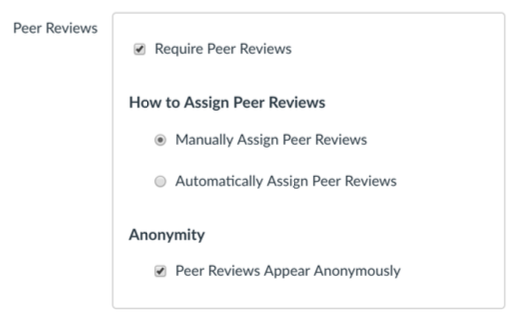
Proper peer review configuration#
2. Rubrics: Although it is not required, it is recommended that the same rubric is used for all assignments. Add your rubric to the first assignment, in subsequent assignments select the same rubric. The figure below depicts proper rubric configuration. This configuration is available from the Assignment page on Canvas (not the Assignment Editing page). Rubrics should additionally adhere to the following guidelines: - Rubric elements should be clear and orthogonal. - Any mistake should have a clear rubric element for marking off. - Make each rubric element worth the same amount. - Use a 10 point scale for all rubric elements. - Design a rubric which uses most of the grading range.
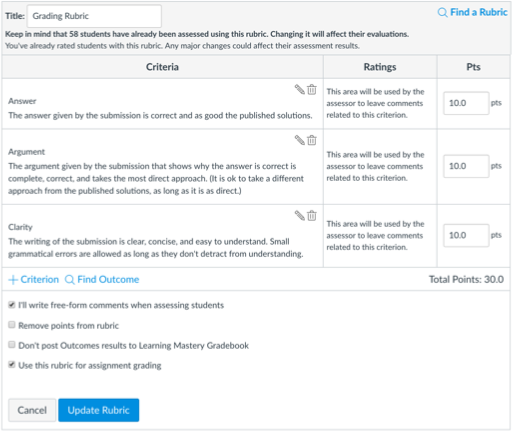
Proper rubric configuration#
3. Groups: Canvas allows several options for how group work is dealt with. You must leave the “Assign Grades to each Student Individually” box unchecked (see figure below). This configuration is available from the Assignment Editing page on Canvas. The following policies on groups is recommended: - Be explicit with your students on how groups work in Canvas. Specifically, they must join a group before submitting the assignment. Failure to do so will result in the assignment only being submitted as a solo submission. Students can resubmit after joining a group and it will correct the problem. In the eventuality that some students do not join groups correctly, after all grades are set, you can copy their partner’s grade into their grade in the Gradebook (on Canvas). - Implement a policy of deducting points for joining groups after submitting assignments. - Use a simple naming scheme for groups on Canvas, such as “Group A”, “Group B”, etc.
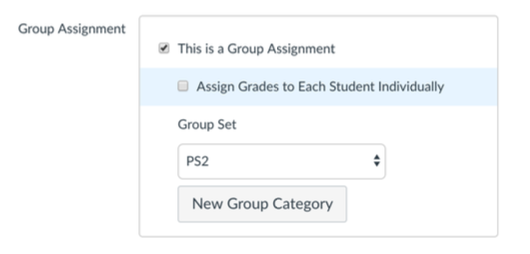
Proper group configuration#